
AI Subtitles & Captions

Transform your videos with professional captions. Sonix automatically generates accurate subtitles with frame-perfect timing, then lets you customize, style, and export to any format—including burnt-in captions.

15+ export formats
Frame-perfect
Burn-in included
Timing
Formats
Styling
Burn-in
Languages
SDH
15+
Export formats
SRT, VTT, FCPXML & more
53+
Languages
Including regional dialects
100ms
Precision
Frame-perfect accuracy
2.7M+
Users
Trusted by professionals
Subtitle Features

Professional subtitles for every platform

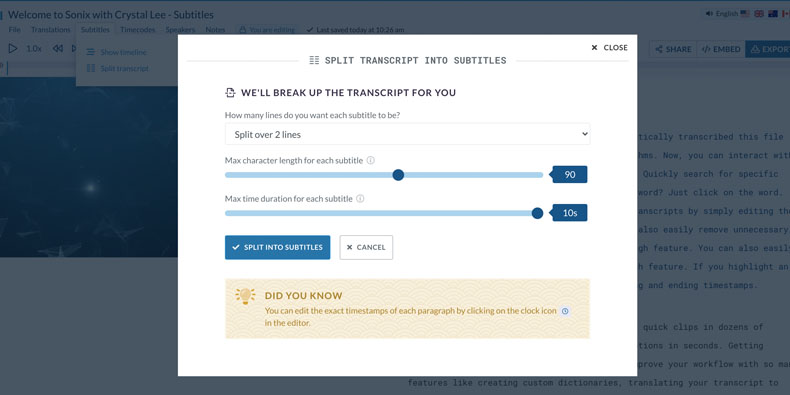
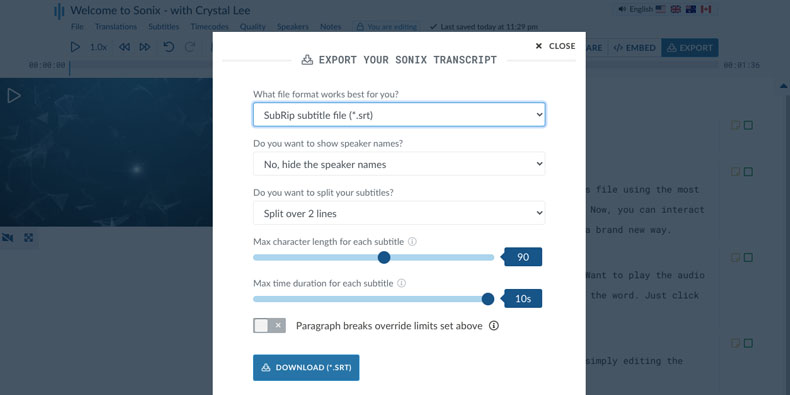
Smart Subtitle Splitting

Automatically split your transcript into perfectly-timed captions. Control character limits, line count, and duration to meet any platform's requirements—from YouTube's recommendations to broadcast standards.

Smart subtitle splitting with character and time controls

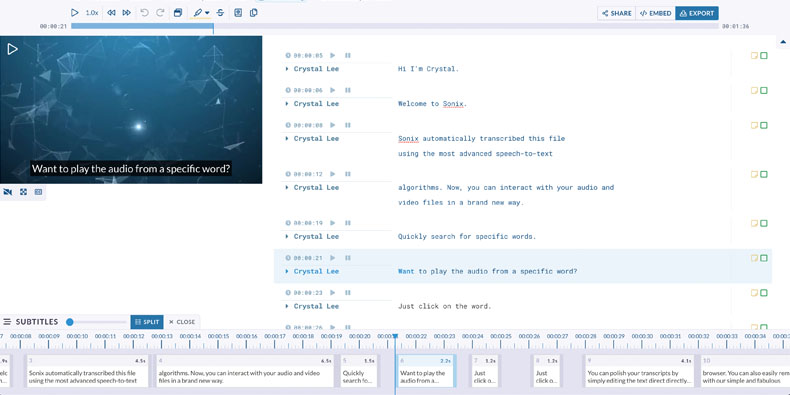
Visual Timeline Editor

Fine-tune subtitle timing with our visual timeline. Drag edges to adjust start and end points, or click any word to hear the audio and verify timing. Frame-perfect precision without complex software.

Visual timeline editor for subtitle timing

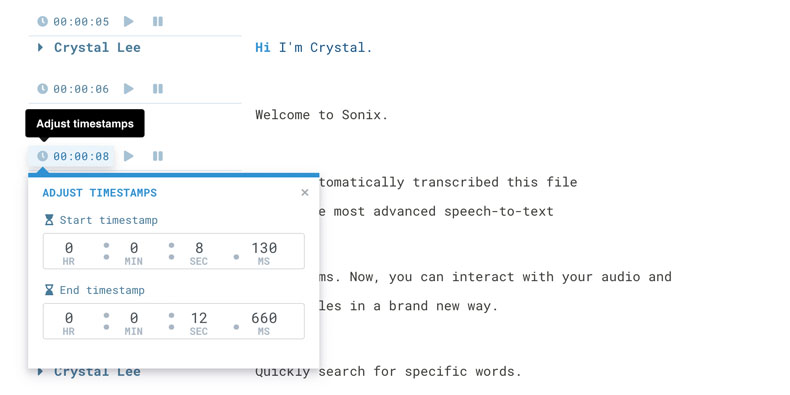
Millisecond Timecode Control

Adjust subtitle timing down to the millisecond for perfect synchronization. Easily shift all captions or individual lines to match your video perfectly, even after edits or speed changes.

Millisecond timecode adjustment controls

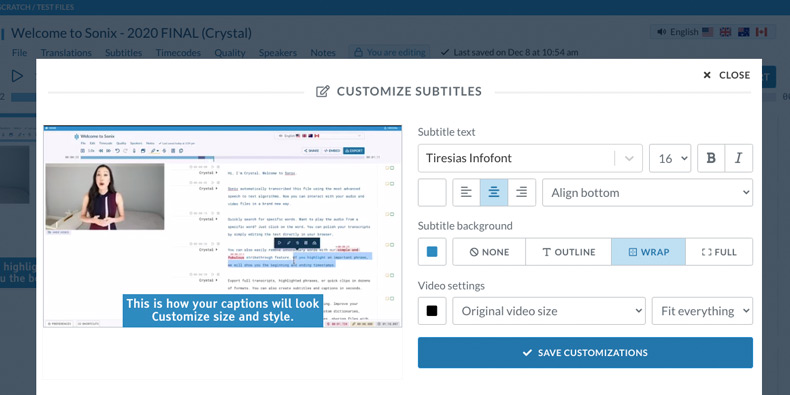
Full Subtitle Styling

Customize fonts, colors, backgrounds, and positioning. Create captions that match your brand or meet accessibility requirements. Preview changes in real-time before export.

Subtitle styling customization options

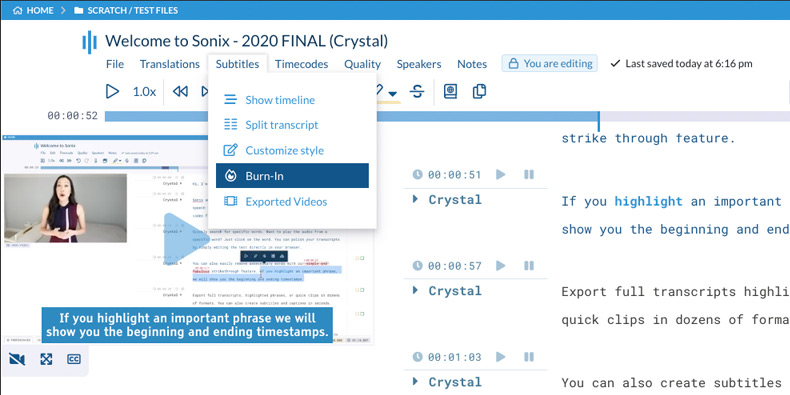
Burn-In Captions

Permanently embed subtitles directly into your video file. Perfect for social media where viewers can't toggle captions. Sonix burns in your styled captions and delivers a ready-to-share video.

Burn-in captions preview

Export to Any Format

Download subtitles in SRT, VTT, SBV, STL, DFXP, and more. Export to professional formats like FCPXML, EDL, and AVID markers for seamless editing software integration.

Subtitle export format options: SRT, VTT, FCPXML

Multi-Language Subtitles

Generate subtitles in 53+ languages from a single upload. Translate your transcript and export captions in multiple languages to reach global audiences.

View all languages
Common Questions

Everything you need to know about
AI subtitles

How do I create subtitles with Sonix?

Upload your video or audio file to Sonix, and our AI transcribes it with word-level timestamps in minutes. The transcript automatically converts to subtitle format—you can then split captions to your preferred length, adjust timing, customize styling, and export to any format. The entire process takes about 5 minutes per hour of video.

What subtitle formats does Sonix support?

Sonix exports subtitles in 15+ formats including SRT (SubRip), VTT (WebVTT), SBV (YouTube), STL, DFXP/TTML, FCPXML (Final Cut Pro), EDL, AVID markers, and more. Each format is properly formatted for its intended platform, with correct timecode formats and character encoding.

Can I burn subtitles directly into my video?

Yes. Sonix's burn-in feature permanently embeds your styled subtitles into the video file. Choose your font, color, size, background, and position, then Sonix renders a new video with captions baked in. This is ideal for social media platforms where viewers watch with sound off and can't enable captions.

How accurate is Sonix subtitle timing?

Sonix generates subtitles with millisecond-level precision. Each word is timestamped to within 100ms of when it's spoken. Our visual timeline editor lets you fine-tune any timing down to the frame. The result is perfectly synchronized captions that match lip movements and audio cues.

Can I create subtitles in multiple languages?

Yes. After transcribing your video, you can translate the transcript into any of 53+ languages with one click. Each translation maintains subtitle timing, so you can export properly-timed captions in Spanish, French, German, Chinese, Japanese, and dozens more. This makes it easy to reach international audiences.

What's the difference between subtitles and closed captions?

Subtitles display dialogue for viewers who can hear but may not understand the spoken language. Closed captions are designed for deaf and hard-of-hearing viewers—they include speaker identification and descriptions of important sounds. Sonix creates both: standard subtitles for any language, and SDH (Subtitles for the Deaf and Hard of Hearing) with full accessibility features.

Why Sonix Subtitles

Subtitles that are
fast, accurate, and professional

Minutes, not hours

Generate subtitles for an hour of video in about 5 minutes. No more typing every word or paying transcribers by the minute. Upload your video and get perfectly-timed captions automatically.

Frame-perfect timing

Word-level timestamps ensure captions appear exactly when words are spoken. Our visual timeline editor makes it easy to fine-tune timing for perfect lip-sync, even with fast dialogue or overlapping speakers.

Any format, any platform

Export to 15+ subtitle formats for any workflow. Whether you need SRT for YouTube, VTT for web players, or FCPXML for Final Cut Pro, Sonix delivers properly formatted files ready to use.

Burn-in for social media

Create scroll-stopping content with burnt-in captions. Customize styling to match your brand, then download a video with subtitles permanently embedded—perfect for Instagram, TikTok, and LinkedIn.

Why Choose Sonix

The smart choice for subtitle creation

What makes Sonix different from YouTube's auto-captions?

YouTube's auto-captions are view-only and limited to their platform. Sonix gives you complete control: edit every word, adjust timing to the millisecond, customize styling, and export to any format. You own your caption files and can use them anywhere—social media, broadcast, streaming platforms, or your own website.

How does Sonix compare to hiring a captioning service?

Professional captioning services charge $1-3 per minute of video and take days to deliver. Sonix costs $10 per hour (about 8 cents per minute) and delivers in minutes. For most content, Sonix accuracy matches professional services. When you need 100% accuracy, our editor makes it fast to review and polish the results.

Can I use Sonix subtitles for broadcast and streaming?

Yes. Sonix exports to professional formats including SCC for broadcast, DFXP/TTML for streaming platforms, and FCPXML for post-production workflows. Our subtitles meet FCC captioning requirements and international broadcast standards when properly reviewed.

Do burnt-in captions affect video quality?

Sonix maintains your original video quality when burning in captions. You control the output resolution and format. For social media, we optimize file size while preserving visual quality. For professional use, you can specify exact encoding settings.

Customer Reviews

Trusted by video creators worldwide

4.98 rating from 211 reviews

I was simply awed by speed and accuracy of your transcription service.
MK
Myung K.
Queens, NY, USA
Your product is incredible. I love it!
DC
David C.
Innsbruck, Austria
After trying a few other trial software, Sonix was by far the best and most correct.
JL
Josh L.
Balwyn North, Australia
Sonix is just so smooth and simple. Love it. No bugs, very intuitive. Oh and your software is surprisingly accurate!
DS
Dominick S.
Mannheim, Germany
Found you through Google. Super easy to use. Transcribed 98% correctly even though it was not a great audio file.
RA
Rana A.
Ann Arbor, MI USA
Amazing for foreign videos that need subtitles. The platform is super easy to use and gave me EXACTLY what I was looking for.
FN
Fiona N.
East Falmount, MA, USA
Get Started

Create subtitles in minutes

Join over 5 million users who trust Sonix for professional subtitles. Get 30 minutes free—no credit card required.

Other great features by Sonix

The complete platform for
audio & video intelligence

99% accuracy. Every word matters.

AI transcription and translation in 53+ languages.

30 minutes free
No credit card
Cancel anytime
