
AI Translation

Break language barriers with AI-powered translation. Sonix instantly translates your transcripts with professional accuracy, complete with side-by-side comparison and multi-language subtitle export.

54+ translation languages
Instant translation
Side-by-side editor
EN
Hello, welcome to Sonix
ES
Hola, bienvenido a Sonix
FR
Bonjour, bienvenue sur Sonix
DE
Hallo, willkommen bei Sonix
JA
Sonixへようこそ
54+
Translation Languages
Including rare & regional languages
Instant
Translation
Translate entire transcripts in seconds
2.7M+
Users
Global teams trust our translations
20+
Export formats
SRT, VTT, DOCX, PDF & more
Translation Features

Professional translation
built into your workflow

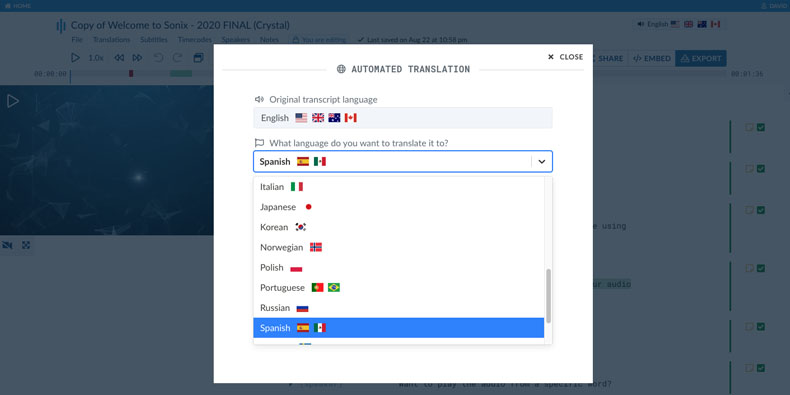
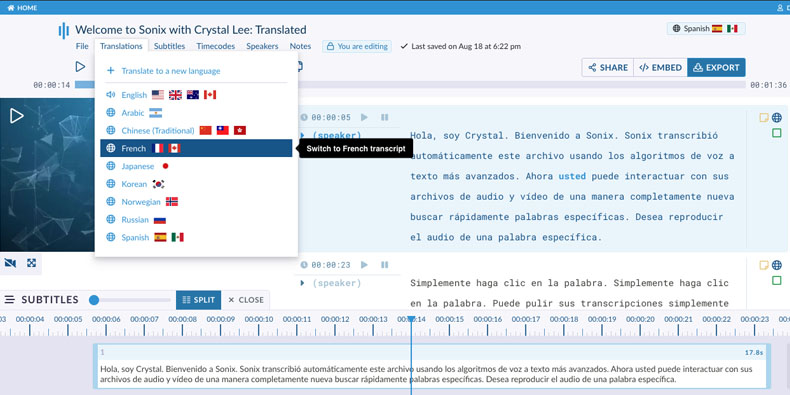
54+ Languages Supported

Translate your transcripts into 54+ languages including Spanish, French, German, Chinese, Japanese, Arabic, Portuguese, and many more. Each translation maintains the original timing and speaker information.

View all languages
Sonix translation language selection showing 54+ supported languages

In-Browser Translation Editor

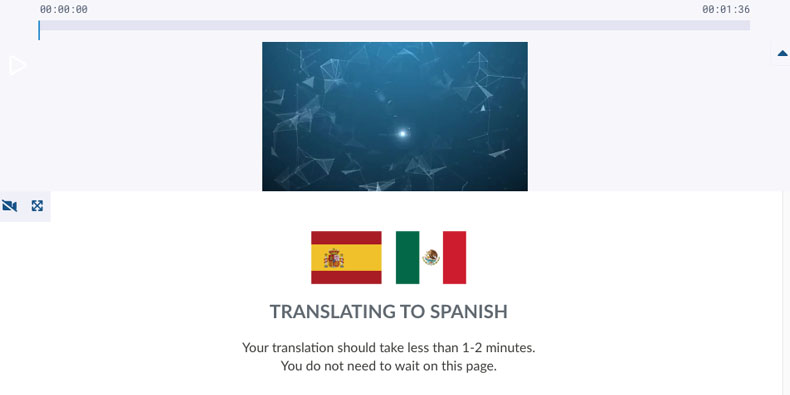
Edit and polish your translations with the same powerful tools you use for transcription. Click any word to hear the original audio and verify translation accuracy.

Explore the editor
Sonix in-browser translation editor

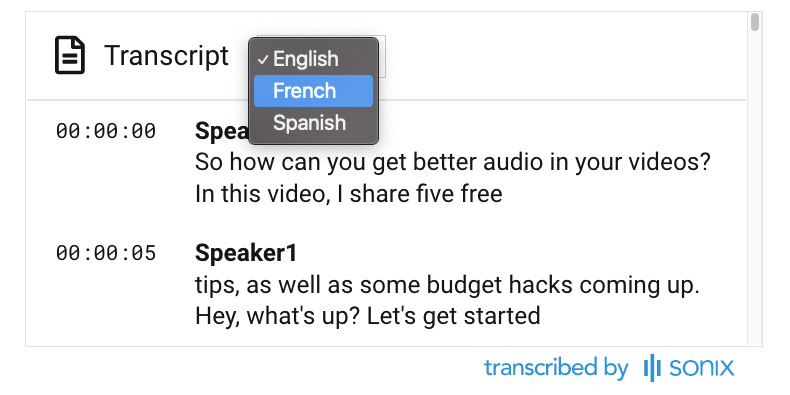
Media Player Language Toggle

Switch between languages instantly in the Sonix media player. Viewers can toggle between the original transcript and any translation with a single click.

Media player with language toggle

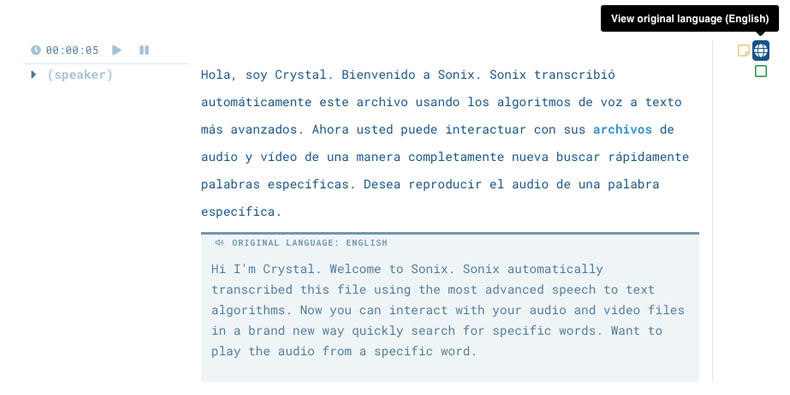
Side-by-Side Comparison

View your original transcript alongside the translation for easy review. Spot discrepancies, verify context, and polish translations without switching between tabs.

Side-by-side translation comparison

Multi-Language Subtitles

Generate subtitles in multiple languages from a single transcript. Export SRT or VTT files for each language to reach global audiences on YouTube, Vimeo, and other platforms.

Multi-language subtitle export
Common Questions

Everything you need to know about
AI translation

How does AI translation work in Sonix?

Sonix uses advanced neural machine translation to convert your transcripts into 54+ languages. After transcribing your audio, simply select your target language and Sonix translates the entire transcript while preserving timestamps, speaker labels, and formatting. The translation happens in seconds, and you can edit the results in our browser-based editor.

How accurate is Sonix translation?

Sonix uses state-of-the-art AI translation models that deliver professional-quality results for most content types. Translation accuracy varies by language pair and content complexity. For critical translations, we recommend using the side-by-side comparison feature to review and polish the output. The more context in your transcript, the better the translation quality.

What languages does Sonix translate to and from?

Sonix supports translation between 54+ languages including English, Spanish, French, German, Italian, Portuguese, Dutch, Russian, Chinese (Simplified and Traditional), Japanese, Korean, Arabic, Hindi, and many more. You can translate from any supported language to any other supported language, enabling truly global content distribution.

Can I edit translations after they're created?

Yes. Sonix provides a full-featured translation editor where you can modify any translated text. The editor shows your translation synchronized with the original audio, so you can verify accuracy by listening. You can also use side-by-side comparison to view the original and translation together while making edits.

How do I create subtitles in multiple languages?

After translating your transcript, export subtitles in any language you've translated to. Sonix generates properly formatted SRT or VTT files for each language. You can customize subtitle timing, line length, and styling before export. This makes it easy to add multilingual subtitles to videos on YouTube, Vimeo, or any platform.

Is AI translation better than human translation?

AI translation offers significant advantages in speed and cost—translations complete in seconds rather than days, at a fraction of the price. For most business content like meetings, interviews, and presentations, AI translation provides excellent quality. For content requiring cultural nuance, legal precision, or creative adaptation, you may want to review and polish the AI output or use professional human translators for final refinement.

Why Sonix Translation

Translation that's
fast, accurate, and integrated

Instant translation

Translate hours of content in seconds. No waiting for human translators or managing multiple vendors. Click a button and your transcript is translated immediately.

Professional quality

State-of-the-art neural translation delivers accurate results that preserve meaning and context. Side-by-side comparison makes review and refinement easy.

Built into your workflow

Translation is seamlessly integrated with transcription. No exporting, uploading to another tool, or reformatting. Everything stays in one place.

Reach global audiences

Expand your content's reach with 54+ languages. Create multi-language subtitles, share translated transcripts, and break down language barriers.

Why Choose Sonix

The smart choice for
transcript translation

What makes Sonix different from Google Translate?

Unlike general translation tools, Sonix is purpose-built for transcript translation. We preserve timestamps, speaker labels, and formatting. Our side-by-side editor lets you compare original and translated text while listening to audio. And we integrate translation directly with transcription—no copy-pasting between tools.

How much does Sonix translation cost?

Sonix translation is included with your transcription. There's no separate charge for translating your transcripts. You pay only for transcription time ($10/hour), and you can translate each transcript into as many languages as you need at no additional cost.

Can I use Sonix translation for business content?

Absolutely. Sonix is used by over 5 million professionals to translate business meetings, interviews, webinars, training videos, and more. We're SOC 2 certified and HIPAA compliant, so your content is secure. Enterprise plans include team collaboration features and API access for automation.

How does translation work with subtitles?

After translating your transcript, you can export subtitles in any translated language. Sonix generates properly timed SRT or VTT files that match your video. This means you can create subtitles in 54+ languages from a single transcription, dramatically expanding your video's global reach.

Customer Reviews

Trusted by professionals worldwide

4.98 rating from 211 reviews

The best thing ever, nothing more to say.
RG
Rasool G.
Tehran, Iran
I tried 4 other services, and Sonix is the easiest to use, most accurate, and more reasonably priced for the quality.
MJ
Melissa J.
Prague, Czechia
My transcript work flow is so fast now. It takes me half the time it used to. So glad i found you :)
SG
Shimrit G.
Tel Aviv, Israel
It really accelerated my work and I was amazed by the accuracy, especially given that the video featured only non-native speakers.
MC
Martin C.
Nottingham, United Kingdom
I tried a few transcription services and I found yours to be clearly superior. The results were more complete and accurate.
JM
Joel M.
Doylestown, PA USA
I love the platform and its been a transcription godsend.
CS
Caridad S.
New York, NY USA
Get Started

Start translating in minutes

Join over 5 million users who trust Sonix for professional translation. Translation is included free with transcription—no additional cost.

Other great features by Sonix

The complete platform for
audio & video intelligence

99% accuracy. Every word matters.

AI transcription and translation in 53+ languages.

30 minutes free
No credit card
Cancel anytime