
Collaborate

Invite team members to view or edit transcripts, control permissions at every level, and collaborate in real-time. Sonix makes teamwork effortless with built-in sharing, comments, and version history.

Easy sharing
Granular permissions
Team folders
View
Edit
Team
Permissions
Folders
Comments
1-click
Team sharing
Share with anyone instantly
Granular
Access control
Control every action
2.7M+
Active users
Share with any team size
Shared
Team folders
Keep everyone in sync
Collaboration Features

Powerful tools for team collaboration

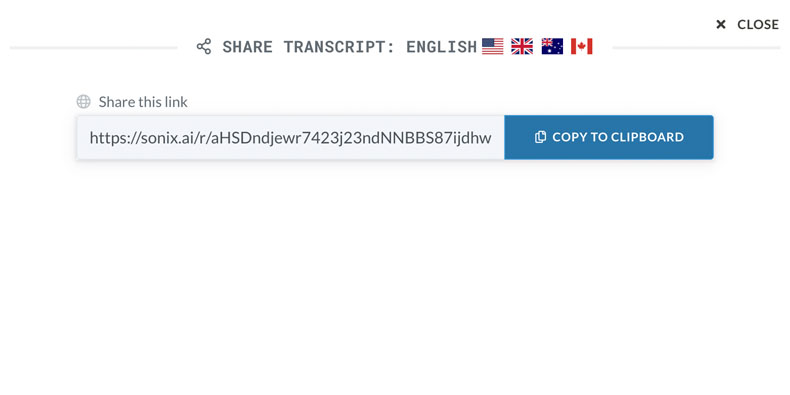
Share with Read-Only Access

Share transcripts with stakeholders who need to view but not edit. Perfect for sharing with clients, executives, or external reviewers. They can read, search, and listen without changing anything.

Share transcripts with read-only access

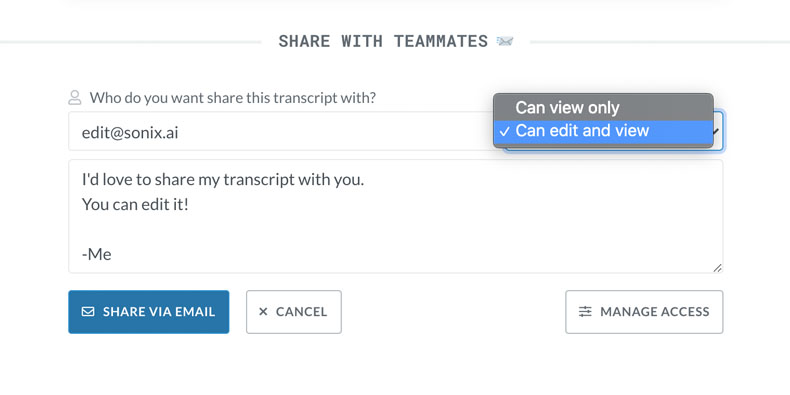
Share with Edit Access

Give team members full editing permissions on specific transcripts. Collaborators can make corrections, add comments, and polish the transcript together. Changes sync in real-time.

Share transcripts with edit access

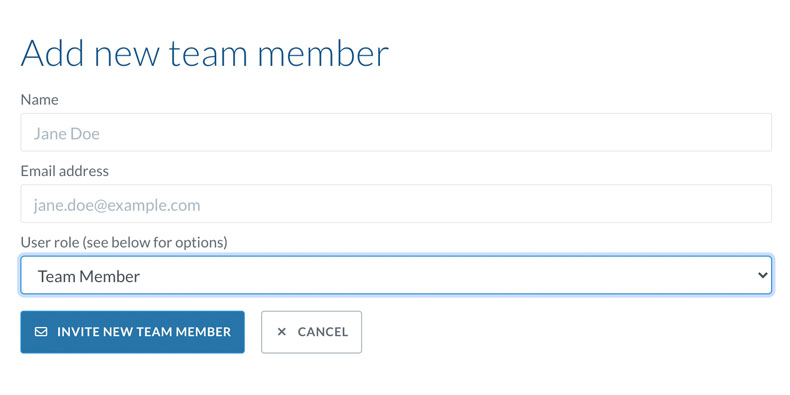
Multi-User Collaboration

Multiple team members can work on the same transcript simultaneously. See who's editing in real-time, avoid conflicts, and collaborate seamlessly. Perfect for fast-turnaround projects.

Multi-user real-time collaboration

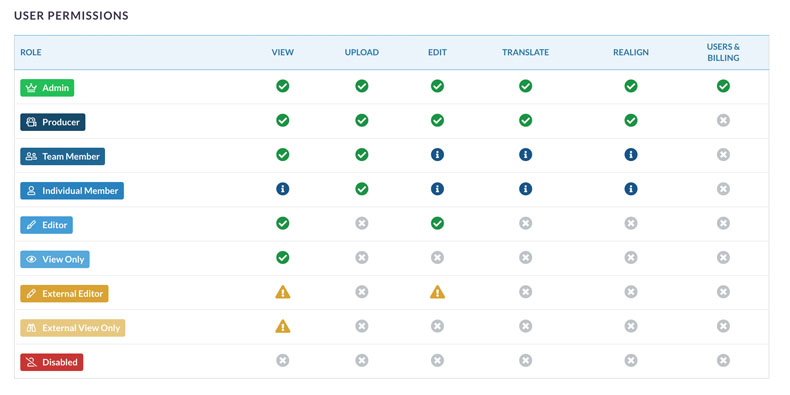
Granular Permissions

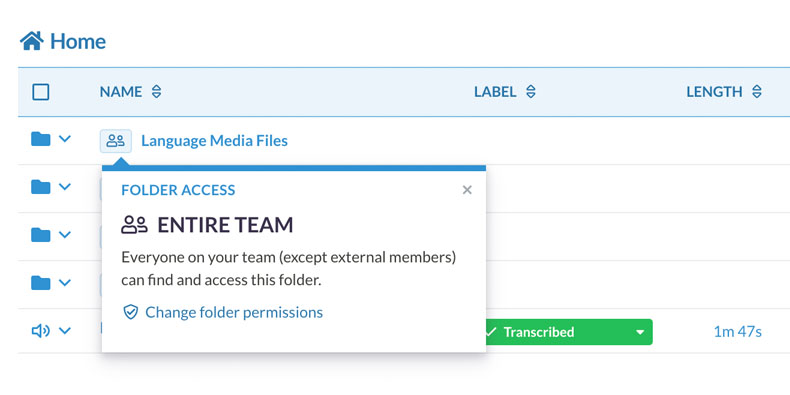
Control exactly what each team member can do. Set permissions at the account, folder, or file level. Restrict who can share, export, or delete content. Enterprise-grade access control.

Granular permission controls

Team Folders

Organize transcripts in shared team folders. Everyone with access sees the same content, automatically synced. Perfect for projects, departments, or client work.

Shared team folders
Common Questions

Everything you need to know about
team collaboration

How do I share a transcript with my team?

Click 'Share' on any transcript and enter your team member's email address. Choose whether they can view only or also edit. They'll receive an email invitation and can access the transcript immediately after accepting.

Can multiple people edit a transcript at the same time?

Yes. Sonix supports real-time multi-user editing. Multiple collaborators can work on the same transcript simultaneously. You'll see who else is editing and their changes appear in real-time. The system prevents editing conflicts automatically.

How do permissions work in Sonix?

Permissions can be set at three levels: account, folder, and file. Account-level permissions control what actions users can take globally. Folder permissions determine access to groups of transcripts. File permissions let you share individual transcripts with specific access levels.

What's the difference between read-only and edit access?

Read-only access lets users view, search, and listen to transcripts but not make changes. Edit access allows full editing capabilities including text changes, speaker labels, and timestamps. Both access levels can be combined with additional restrictions like preventing downloads or sharing.

Can I create shared folders for my team?

Yes. Team folders let you organize transcripts that multiple people need to access. When you upload to a team folder, everyone with folder access can see the transcript immediately. This is perfect for ongoing projects, client accounts, or departmental organization.

Is collaboration included in all plans?

Basic sharing is available on all plans. Advanced collaboration features like multi-user editing, granular permissions, and team folders require Premium or Enterprise plans. Enterprise plans add SSO, audit logs, and admin controls for larger organizations.

Why Collaborate with Sonix

The easiest way to work
together on transcripts

Simple sharing

Share transcripts with anyone in seconds. Just enter their email and choose their access level. No complicated setup or training required.

Complete control

Set exactly who can view, edit, share, and export each transcript. Granular permissions ensure sensitive content stays protected.

Real-time collaboration

Work together simultaneously on the same transcript. See changes as they happen and collaborate without version conflicts.

Stay organized

Team folders keep everyone's work in sync. Share entire collections of transcripts with the right people automatically.

Why Choose Sonix

Built for teams that work together

Why is Sonix the best for team collaboration?

Sonix was built from the ground up for teams. Unlike basic transcription tools, we offer real-time multi-user editing, granular permissions, team folders, and enterprise security. Everything your team needs is in one platform—no switching between tools.

How do teams typically use Sonix collaboration?

Research teams share transcripts with collaborators for review. Media teams work together on interview transcripts. Legal teams share depositions with read-only access. Businesses create team folders for departments. Sonix adapts to any workflow.

Is Sonix secure enough for confidential content?

Absolutely. Sonix is SOC 2 Type II certified and offers HIPAA compliance. All data is encrypted in transit and at rest. Enterprise plans include SSO, audit logs, and data residency options. We're trusted by Fortune 500 companies, healthcare organizations, and legal firms.

Can Sonix handle large teams?

Yes. Enterprise plans support unlimited users with advanced admin controls. Manage teams with SSO integration, set organization-wide policies, and monitor usage with detailed analytics. Our infrastructure scales to support organizations of any size.

Customer Reviews

Trusted by teams worldwide

4.98 rating from 211 reviews

This technology managed to shock me! It saved me so much time and effort!
KU
Kaan U.
Wassenaar, Netherlands
I have been a dialogue system researcher for half a decade now. I had build my own app for doing the transcriptions. Sonix was clearly better than what I had. I made the switch!
RM
Ramesh M.
Portland, OR USA
Easy to use and saved me mega amounts of time!
LM
Lynn M.
Manchester, England, UK
I love the platform and its been a transcription godsend.
CS
Caridad S.
New York, NY USA
I tried 3 other tools online and I can say that sonix blows them out of the water. I was very impressed with the ease of use, the % of words correctly translated and how simple it ...
MB
Maria B.
Peoria, AZ USA
Truly amazing. Saved me hours of work. And about 95% accurate which is great for a South African accent recording.
RC
Ruan C.
Pretoria, South Africa
Get Started

Start collaborating with your team today

Join thousands of teams who collaborate on transcripts with Sonix. Get 30 minutes free—no credit card required.

Other great features by Sonix

The complete platform for
audio & video intelligence

99% accuracy. Every word matters.

AI transcription and translation in 53+ languages.

30 minutes free
No credit card
Cancel anytime