Reviewed by David Dat Nguyen, CXO Last updated

Best
MP3 to text converter for the file you have

Seven converters compared on what each one publishes, a verdict by file length and speaker count, and the limits spelled out. Sonix is the one for interviews, podcasts and anything you will quote.

30 free minutes. No credit card required.See pricing

30 free minutes
54+ languages
18+ export formats

The best MP3 to text converter depends on the file

For a short, clear memo, a free route gets you the words. For interviews, podcasts and anything with more than one speaker or a deadline, Sonix: speaker labels, an editor that plays the audio under every word, and 18+ export formats, with 30 minutes free.

Otter.ai suits meetings it records as they happen, Descript suits audio you are editing anyway, Rev and Happy Scribe add a human option, and OpenAI Whisper is free if you run it yourself. The table shows what each publishes, and the cards say where each one falls short.

By what you are transcribing

  • A memo with no account: Google Docs voice typing
  • Interviews and anything you will quote: Sonix
  • Meetings you record as they happen: Otter.ai
  • Audio and video you are editing anyway: Descript
  • A transcript a human has checked: Rev
  • A language most tools do not cover: Happy Scribe
  • Developers and self-hosting: OpenAI Whisper
The comparison

MP3 to text, side by side

What each of the 7 vendors publishes about its own product, read on the vendor's own page, listed alphabetically. None of it is a measurement of ours.

ConverterHow it transcribesSpeaker labelsBuilt-in editorLanguagesExportsFree tierPrice
DescriptAI, inside an audio and video editorAutomatic, 8 or more speakersEdit the audio by editing the text25 languagesAudio, video and editor timelines, and text formats not published60 media minutes a monthHobbyist from $16 a month billed annually, or $24 paid monthly
Google Docs voice typingLive dictation through the microphoneNoThe document you type inMany; count not publishedThe Docs export menuIncluded with a Google accountIncluded with a Google account
Happy ScribeAI, with a human optionAutomaticTranscript editor150+ languages and dialectsHigher plans add 15+ formats; the entry plan has TXT, SRT, PDF and DOCXA 10-minute trialBasic $8.50 a month billed annually, $17 monthly, for 120 minutes; extra minutes $0.20; human transcription from $2.00 a minute
OpenAI WhisperAn open-source model you run yourselfNoNone, raw textMultilingual, no count givenCommand-line text filesFree and open source codeFree, but you supply the computer
Otter.aiAI, built for meetings as they happenAutomaticMeeting notes6 languagesTXT free; PDF, DOCX, SRT on paid plans300 minutes a month, 30 per conversation, and 3 file imports in allPro from $8.33 per user a month billed annually, or $16.99 paid monthly
RevAI, with a human optionNot published on the vendor's pageTranscript editorEnglish on the free plan, 37+ languages on the top plansWord, PDF, caption files45 AI minutes every monthEssentials from $25.49 per seat a month billed annually, $29.99 monthly; human transcription $1.99 a minute
SonixAI for uploaded files; up to 99% on clear audioAutomaticAudioText Editor in the browser, 100 ms timing54+ languages18+ formats, Word, PDF, SRT and VTT30 minutes, no card neededPay as you go at $10 an hour, or plans from $25 a month

Every competitor cell was read on the vendor's own page on . Prices change, so check them before you buy.

The converters

7 converters,
by what you are transcribing

Unranked. Each card says what the tool is built for and where it falls short.

Google Docs voice typing

Voice typing in Google Docs costs nothing beyond a Google account and handles clear speech well. It only listens to the microphone: there is no file upload, so an MP3 has to be played aloud or re-dictated in real time, with no timestamps, speaker labels or caption export. Fine for a two-minute memo, painful for an hour.

Best for: A memo with no account

Sonix

Sonix is built for uploaded files: an MP3 comes back about 10x faster than real time with speaker labels and 100 ms word timing, you correct it in the AudioText Editor while the audio plays, and you export any of 18+ formats. Transcription covers 54+ languages and translation 54+. The first 30 minutes are free with no card; after that it is $10 an hour pay as you go, or a plan. A short clip once a year may not need any of this.

Best for: Interviews and anything you will quote

See plans and pay-as-you-go pricing

Otter.ai

Otter.ai is strongest while it records a meeting: live transcription, speaker identification and automatic summaries. For MP3 files the free plan is tight, with 300 minutes a month, 30 minutes per conversation and 3 file imports for the life of the account; Pro from $8.33 per user a month billed annually lifts that to 10 imports a month. AI transcription covers 6 languages.

Best for: Meetings you record as they happen

Read our full Otter.ai review

Descript

Descript treats the transcript as the editing surface: delete a sentence from the text and it leaves the audio. Transcription in 25 languages with speaker detection comes bundled into a creative suite, with 60 media minutes a month free and the Hobbyist plan from $16 a month billed annually. If all you need is the text out of an MP3, you are paying for a studio you may never use.

Best for: Audio and video you are editing anyway

Read our full Descript review

Rev

Rev sells both AI transcription and human transcription at $1.99 a minute, the one to pick when a legal or broadcast deadline wants near-perfect text and you would rather pay than proofread. The free tier gives 45 AI minutes a month in English; Essentials runs $25.49 per seat a month billed annually. Human work takes hours, not minutes, and per-minute pricing climbs fast on long recordings.

Best for: A transcript a human has checked

Read our full Rev review

Happy Scribe

Happy Scribe pairs AI transcription in 150+ languages and dialects with a subtitle editor and human transcription from $2.00 a minute. The Basic plan covers 120 minutes a month at $8.50 billed annually, with extra minutes at $0.20, so heavy months add up next to an hourly rate. A 10-minute trial runs on your own audio.

Best for: A language most tools do not cover

Read our full Happy Scribe review

OpenAI Whisper

Whisper is OpenAI's open-source speech recognition model under the MIT license: one pip install and you transcribe MP3 files on your own machine, nothing uploaded, nothing charged, which suits sensitive audio. You supply the computer, long files can be slow, and you get raw text with no editor, speaker labels or formatted exports unless you script them.

Best for: Developers and self-hosting

Your MP3 file

Before you upload your MP3

Universal audio format supported everywhere

Where MP3 files come from

  • Spotify downloads
  • Podcast apps
  • Music players
  • Voice recorders
  • Web downloads

Do you need to convert it first?

No. Upload the MP3 as it is. Sonix accepts the file directly, so there is nothing for you to convert first.

MP3 or WAV?

WAV files store uncompressed PCM audio, preserving the full recorded signal, but they are roughly ten times larger than an equivalent MP3. MP3 permanently discards audio detail that most listeners cannot hear, which keeps files small for sharing and playback but makes it a poor choice as an editing or archival master. Choose WAV when recording or producing source audio; choose MP3 when file size and universal compatibility matter more than maximum fidelity.

Best WAV to text converter
10x
Faster than real time
A one-hour MP3 in 5 to 6 minutes
99%
Accuracy on clear audio
Nearer 85% on noisy recordings with crosstalk
54+
Languages
Pick the recording's language, translate afterwards
$10
Per hour
Pay as you go after 30 free minutes
Our test

One MP3, transcribed and
counted word by word

A public-domain recording, uploaded to a subscription account on November 2, 2026, then the raw export counted word by word against the corrected one.

Recording
The Right of the People to Rule
Spoken by
Theodore Roosevelt
Recorded
Edison cylinder, August 1912
Duration
4 min
Bitrate
256 kbps
Speakers
1
Language
English
Words
707
Errors
11
Error rate
1.6%
Time correcting in the editor
4 min
The source recording

Library of Congress, Motion Picture, Broadcasting, and Recorded Sound Division

What it got wrong

  • Heard "torgau" for "Turgot"
  • Heard "to a go" for "Turgot"
  • Heard "urbanism" for "Bourbonism"
  • Heard "pump it" for "profit"
  • Heard "expedience" for "expedients"
  • Heard "our" for "are"
  • Heard "zones" for "souls"
  • Heard "when" for "where"
How the errors are counted, with the two transcripts side by side

What the numbers say

11 word errors in 707 words is 98.4% word accuracy, on a speech cut into wax through an acoustic horn 114 years before this test. That is far harder audio than a phone on a meeting table or a podcast microphone, which is why this page quotes the engine at up to 99% on clear audio and this run lands just under it.

Three kinds account for the 8 fixes. A proper name (3): the engine had never heard of Turgot, the French economist Roosevelt cites twice, or of Bourbonism. Period vocabulary (2): profit and expedients, said in a 1912 cadence. Near-homophones a listener could miss too (3): our for are, zones for souls, when for where. No sentence was lost or made up; every miss is a single word misheard, which is what keeps the pass quick.

Correcting took 4 minutes for a 4-minute recording: one listen at normal speed, with the audio playing under the word being fixed. On a hard file that is about a minute of editing per minute of audio, and the names are where the minutes go. A clean modern recording needs fewer stops, and a name that repeats is caught on the first pass once you know to listen for it.

The raw transcript, before the pass

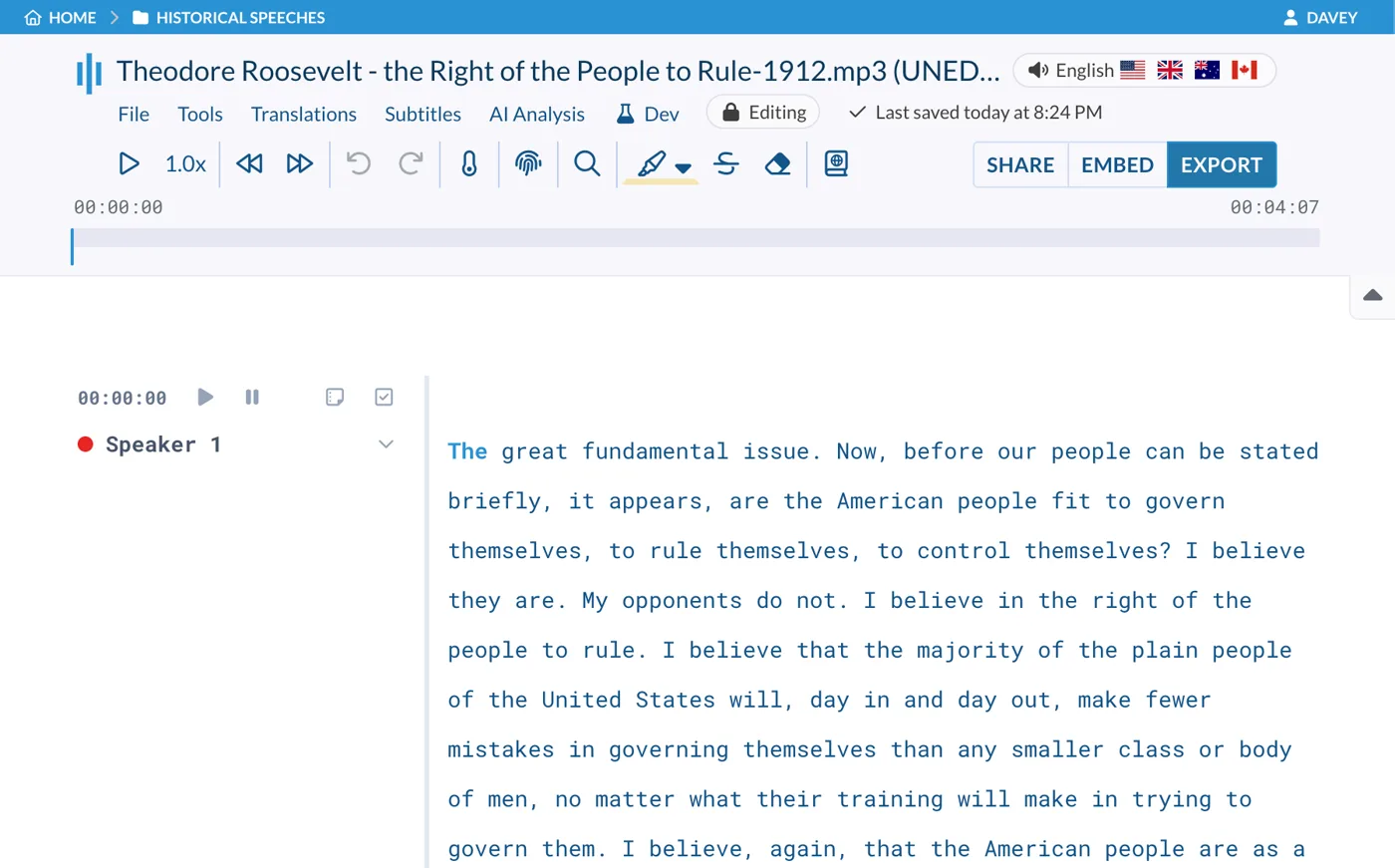
Straight out of the engine in the AudioText Editor: the speaker already labelled, the timeline across the top, and every word tied to its moment in the audio, so a click plays what was said while you fix what was heard.

Explore the AudioText Editor
The MP3 transcript in the Sonix AudioText Editor with speaker labels

Free gets you the words from a short, clean file

One clear speaker, a quiet room and a few minutes of audio: a free route gets you the words. Paid earns its price on length, a second speaker or a deadline.

When a free route works

The three free routes on this page are a trial with 30 minutes, an open-source model you run yourself, and dictation through a document's microphone. All three suit a short recording you will read once.

When paid earns its price

Long files make a real-time-only tool impractical, several speakers need labels a free route will not give you, and raw text is rarely the finished product: the interview becomes an article, the episode needs captions, the research needs timestamps to cite. An editor plus Word, PDF and subtitle exports is what you pay for.

Our transcription cost guide puts a half-hour file at two to four hours of a transcriptionist's time, and a free draft at about an hour of correction. Sonix returns a one-hour file in 5 to 6 minutes, and the correcting happens in the editor against the audio.

What transcription costs, in detail

Limits and price, plainly

  • Files up to 16 GB each.
  • A trial transcribes the first 30 minutes of a long file.
  • On a trial, very long files wait for a quick approval.
  • Trial accounts upload one file at a time; paid accounts upload in batches.
  • After the free minutes: $10 an hour pay as you go, or a plan from $25 a month.
Every plan, on one page
How It Works

Turn MP3 into text in 4 steps

  1. 1
    Upload your MP3

    Create a free account with 30 minutes included and no card, then upload the file in any of 54+ languages.

  2. 2
    Transcribe automatically

    Sonix turns the MP3 into text, timestamps and speaker labels included, about 10x faster than real time.

  3. 3
    Edit in the browser

    Fix names and terms in the AudioText Editor while the audio plays back, word by word.

  4. 4
    Export in your format

    Download TXT, DOCX, PDF, SRT or VTT, ready for a document, captions or an archive.

Accuracy

What decides MP3 transcription accuracy,
more than the logo on the tool

No converter hits its best case on every file. Four things matter more than which one you pick.

Audio quality

A decent microphone in a quiet room transcribes far better than a phone in a pocket; background noise, echo and people talking over each other cost the most. Heavy compression hurts more than the container format does.

Accents and vocabulary

Modern engines handle most accents; product names, jargon and switching languages mid-sentence still trip them. An editor turns those fixes into seconds instead of a retype.

Several speakers

Overlapping speech is the hardest problem in transcription. Automatic speaker labels separate the voices; without them you get one unattributed wall of text.

Common Questions

Questions about converting MP3 to text

How do I convert MP3 to text for free?

Three real routes: the Sonix trial, 30 minutes with no credit card and the editor included; OpenAI Whisper, free and open source if you are comfortable with a command line; or playing a short clip into Google Docs voice typing. Free suits short, clear, single-speaker audio best.

Can Google transcribe an MP3 file?

Not from the file. Google Docs voice typing transcribes live speech from the microphone, per Google's own help page, so the workaround is playing the MP3 aloud near the mic in real time, which is slow and error-prone. For an upload, use a converter that takes files.

Is MP3 to text conversion accurate?

On clear, well-recorded audio Sonix reaches up to 99%; noisy recordings with crosstalk land nearer 85%. Audio quality, accents and how many people talk over each other move the result more than the tool does, so budget a few minutes in the editor for names and jargon whichever converter you use.

How long does it take to convert an MP3 to text?

Minutes. Sonix processes audio about 10x faster than real time, so a one-hour MP3 is usually ready in 5 to 6 minutes. Human services take hours; our cost guide puts a half-hour file at two to four hours of a transcriptionist's time.

What is the best free MP3 to text converter, and what are its limits?

OpenAI Whisper if you can use a command line: free, open source and accurate, with no editor or speaker labels. If you cannot, the Sonix trial gives you 30 minutes with the editor and every export format, and Otter's free plan allows 3 file imports for the life of the account.

Can I convert an MP3 to a Word file?

Yes. Transcribe the MP3, then export the transcript as DOCX with timestamps and speaker labels kept, so it opens ready to edit in Word or Google Docs. TXT, PDF, SRT and VTT come from the same transcript.

Does the MP3 bitrate affect transcription quality?

Less than people expect. An MP3 at 128 kbps or higher keeps the speech detail that matters; heavy compression below about 96 kbps can blur consonants and cost a few words. When you can choose, record and export at the higher bitrate, then spend the effort on a quiet room and a close microphone instead.

How do I turn an MP3 into an SRT file?

Upload the MP3, let the transcript come back with word timing, adjust text and timings in the editor, then export SRT or VTT. Sonix produces both from the same transcript, so a podcast audiogram and a video caption file come from one job.

Can I upload thirty MP3 clips at once?

On a paid account, yes: batch upload takes a folder of clips in one go and each comes back as its own transcript. Trial accounts upload one file at a time.

What about an MP3 in another language, or one I need in English?

Pick the recording's language when you upload, any of 54+, and the transcript comes back in that language. Then translate it into 54+ languages from the same screen if you need it in English or another language.

What you get

What every Sonix transcript comes with

Speaker labels

Each MP3 comes back with who said what, renamed in a single click.

Word-level timing

Every word carries a 100 ms timestamp, so captions and citations land exactly where the audio is.

18+ export formats

TXT, DOCX, PDF, SRT, VTT and more from one transcript, no reformatting.

Translation after transcription

Translate the finished transcript into 54+ languages without a second tool.

Reviews

Why users love Sonix

4.98 rating from 211 reviews

Get Started

Start with 30 free minutes

No credit card. After that, $10 an hour pay as you go or a monthly plan.

99% accuracy. Every word matters, every time.

AI transcription and translation in 54+ languages.

30 minutes free
No credit card
Cancel anytime