AI Transcription

Transform your audio and video files into accurate, searchable text in minutes. Sonix combines cutting-edge AI with professional editing tools to deliver transcription that's fast, accurate, and built for your workflow.

5 min per hour
99% accuracy
53+ languages
Languages
Speakers
Timestamps
Exports
Editor
Dictionary
6.2M+
Users
Trusted by professionals worldwide
53+
Languages
Including regional accents & dialects
99%
Accuracy
For clear audio recordings
<5min
Per hour
Faster than real-time processing
Core Features

Everything you need for
professional transcription

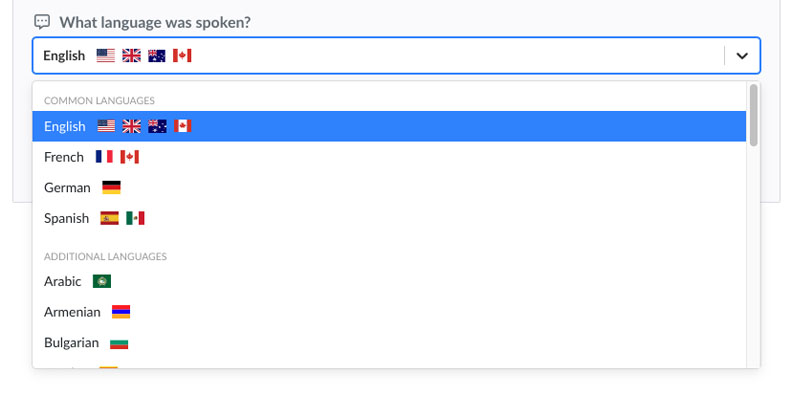
53+ Languages Supported

Transcribe audio in over 53+ languages with native-level accuracy. Our AI understands accents, dialects, and regional variations to deliver precise transcriptions regardless of the source language.

View all languages
Sonix language selection showing 53+ supported languages

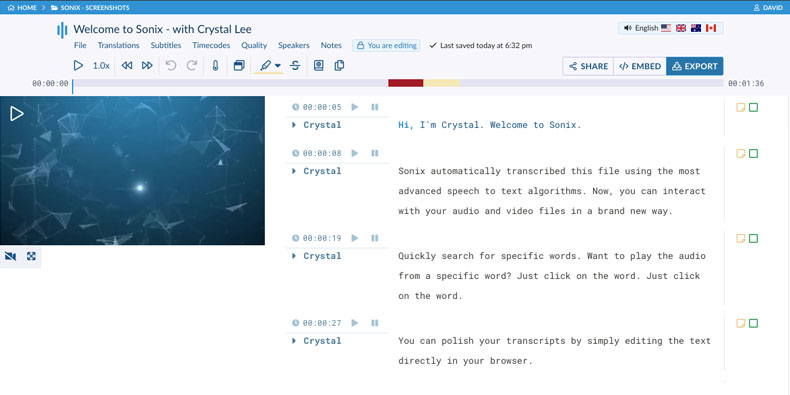
In-Browser Transcript Editor

Polish your transcripts with our powerful web-based editor. Click any word to jump to that moment in your audio. Make corrections, adjust timestamps, and format your transcript without installing software.

Explore the editor
Sonix in-browser transcript editor with audio synchronization

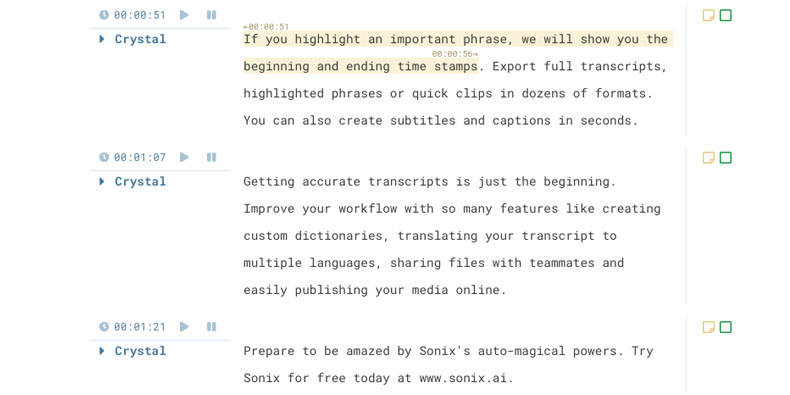
Word-by-Word Timestamps

Every word is automatically timestamped with millisecond precision. Click any word to instantly play the audio from that exact moment—perfect for fact-checking and citation.

Word-by-word timestamps in Sonix transcript

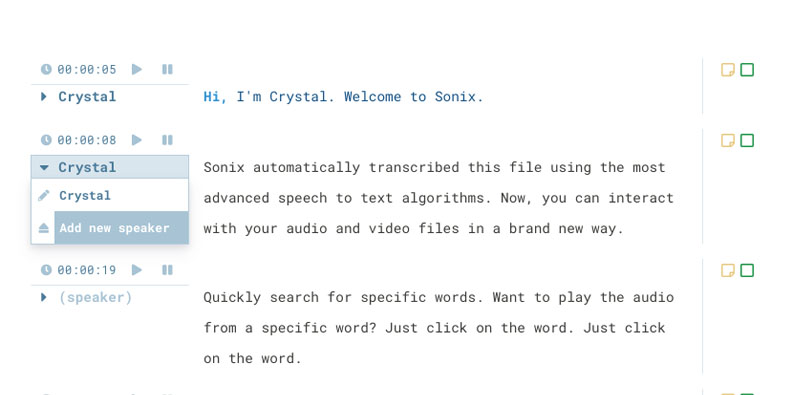
Speaker Identification

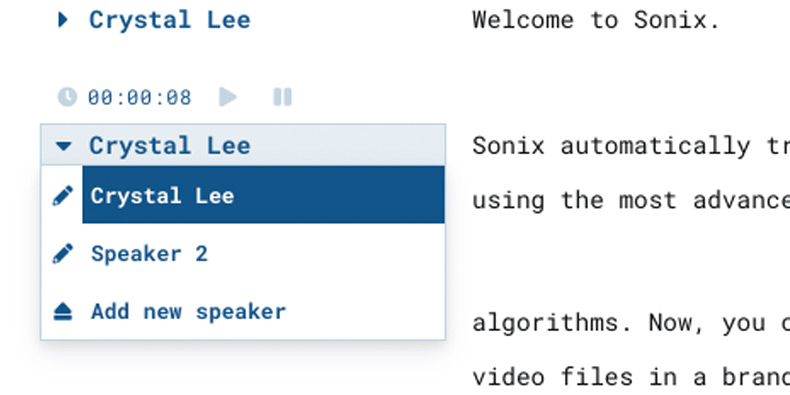
Sonix automatically detects when speakers change and separates dialogue into labeled paragraphs. Easily assign names to speakers with our dropdown menu for professional interview and meeting transcripts.

Speaker labeling dropdown in Sonix

Automated Speaker Diarization

Our AI analyzes voice patterns to automatically identify who said what. Each speaker's dialogue is separated into distinct paragraphs—no manual work required.

Automated speaker diarization in Sonix

Text Exports (DOCX, TXT, PDF)

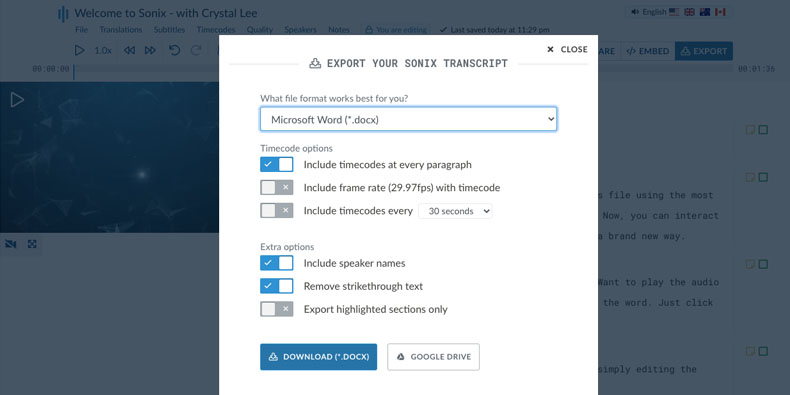
Export your polished transcript in Microsoft Word, plain text, or PDF formats. Choose from multiple formatting options including timestamps, speaker labels, and paragraph styles.

Text export options in Sonix: DOCX, TXT, PDF

Subtitle Exports (SRT, VTT)

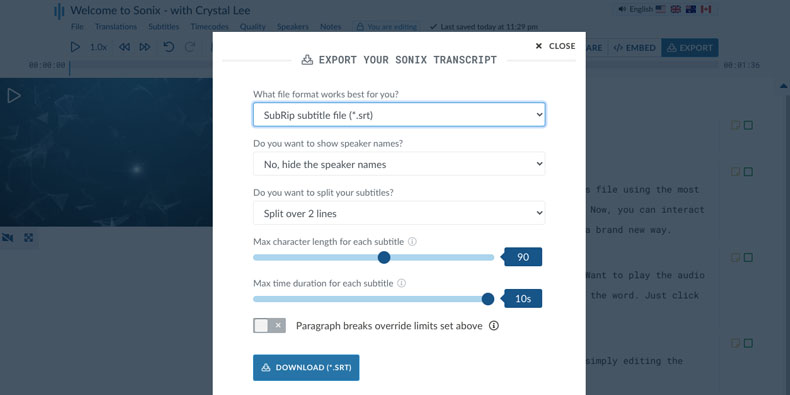
Download your transcript as SRT or VTT subtitle files ready for YouTube, Vimeo, or any video platform. Customize timing, line length, and caption styling.

Subtitle export options in Sonix: SRT, VTT
Additional Features

Power tools for
professional transcription

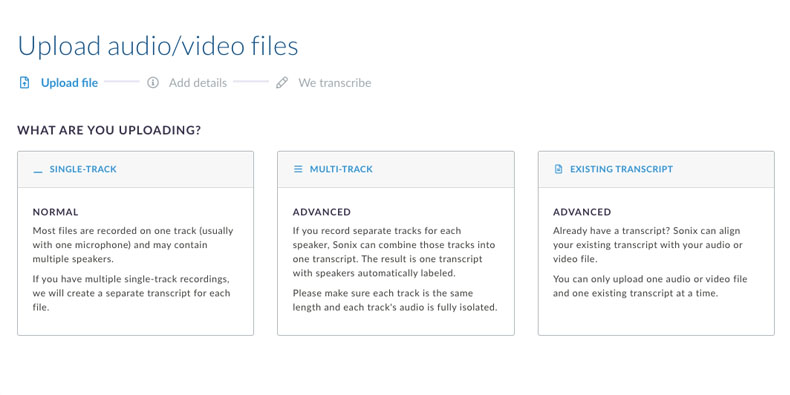
Upload Existing Transcripts

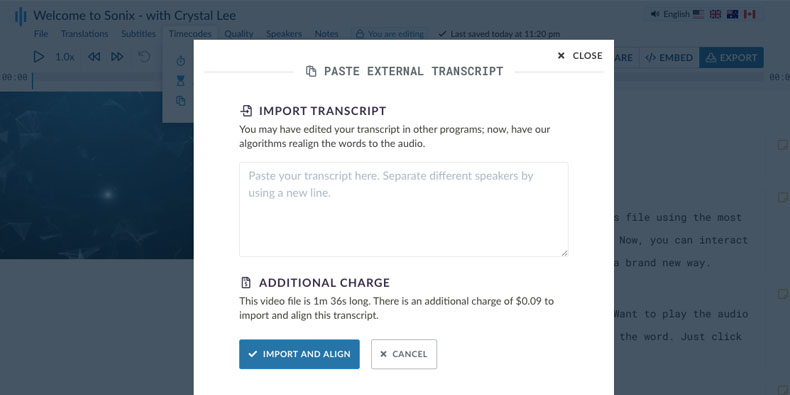
Already have a transcript? Upload it alongside your media file and Sonix will automatically synchronize the text to the audio, adding word-level timestamps to your existing content.

Upload existing transcript to Sonix

Notes & Commenting

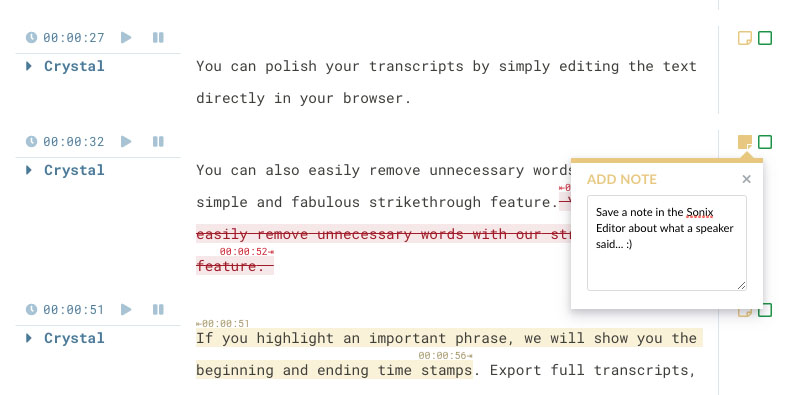
Add timestamped notes and comments directly in your transcript. Perfect for collaboration, research annotations, or marking important moments for review.

Notes and commenting in Sonix transcript

Custom Dictionary

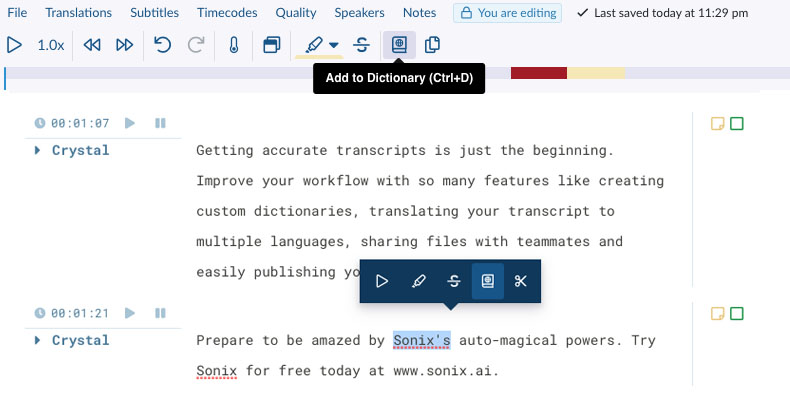
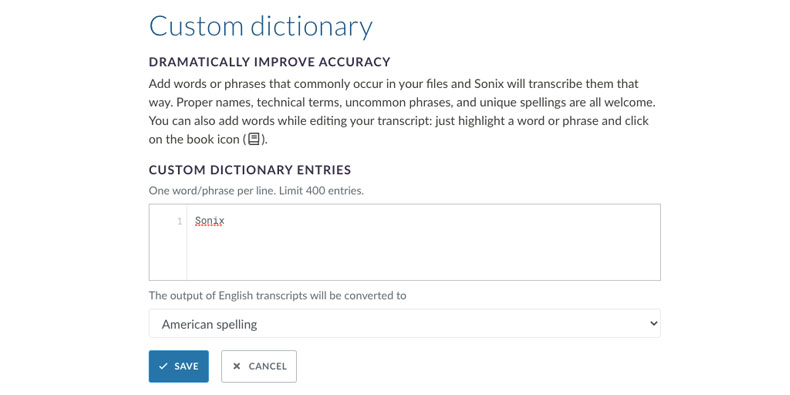
Add company names, technical terms, and industry jargon to your custom dictionary. Sonix prioritizes these words during transcription for higher accuracy on specialized content.

Custom dictionary in Sonix

Multiple Custom Dictionaries

Create separate dictionaries for different clients, projects, or content types. Select the right dictionary during upload to optimize accuracy for each transcription job.

Multiple custom dictionaries in Sonix

Automated Timecode Realignment

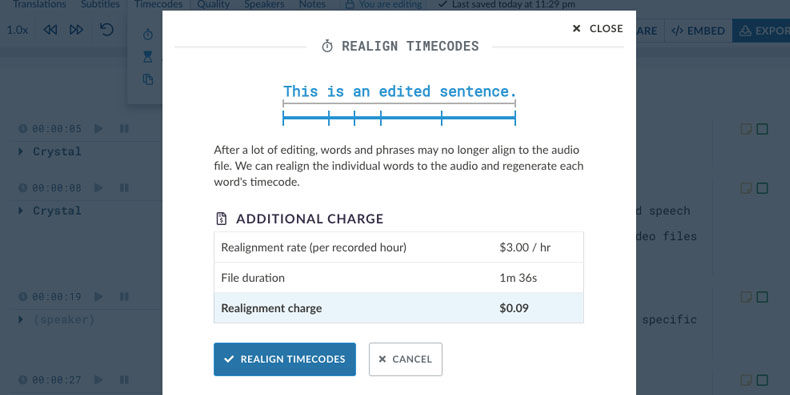
After editing your transcript, realign all timestamps with a single click. Sonix recalculates word timing to match your changes, keeping audio and text perfectly synchronized.

Automated timecode realignment in Sonix

Multitrack Audio Uploads

Upload multiple audio tracks from the same recording session. Sonix combines them into a single transcript with speakers automatically labeled from each track.

Multitrack audio upload in Sonix
Common Questions

Everything you need to know about
AI transcription

What is AI transcription and how does it work?

AI transcription uses machine learning and neural networks to convert spoken audio into written text. Sonix's AI is trained on millions of hours of audio across different accents, languages, and recording conditions. When you upload a file, our AI analyzes the audio waveforms, identifies speech patterns, and converts them to text with word-level timestamps. The entire process takes approximately 5 minutes per hour of audio.

How accurate is Sonix transcription?

Sonix delivers up to 99% transcription accuracy for clear audio recordings. Our AI is independently verified as one of the most accurate automated transcription services available. Accuracy depends on audio quality, background noise, speaker clarity, and vocabulary. For specialized terminology, our Custom Dictionary feature lets you add industry-specific words to improve accuracy even further.

What languages does Sonix support for transcription?

Sonix supports transcription in 53+ languages including English, Spanish, French, German, Italian, Portuguese, Dutch, Japanese, Chinese, Korean, Arabic, Hindi, and many more. Our AI understands regional accents and dialects within each language. You can also transcribe multilingual audio where speakers switch between languages.

Can I edit transcripts after they're created?

Yes. Sonix includes a powerful in-browser editor where the transcript is synchronized with your audio. Click any word to jump to that moment in the recording. You can edit text, adjust speaker labels, correct timestamps, add notes, and format paragraphs. All changes save automatically, and you can export your polished transcript in multiple formats.

What file formats does Sonix accept?

Sonix accepts all major audio and video formats including MP3, MP4, WAV, M4A, FLAC, OGG, MOV, AVI, WMV, and WebM. Files up to 4GB can be uploaded directly. For larger files, you can upload via URL or connect cloud storage like Google Drive, Dropbox, or OneDrive.

How does speaker identification work?

Sonix's speaker diarization AI analyzes voice characteristics like pitch, tone, and speech patterns to identify when different people are speaking. The transcript is automatically divided into paragraphs for each speaker change. You can then assign names to each speaker using the dropdown menu, and those labels will appear throughout the transcript.

Why Sonix

Transcription that's
fast, accurate, and professional

Transcribe in minutes, not hours

Our AI processes audio 12x faster than real-time. A one-hour recording takes about 5 minutes to transcribe completely—thousands of times faster than manual transcription.

99% accuracy you can depend on

Independently verified as one of the most accurate automated transcription services. Our AI is trained on diverse audio data to handle accents, technical vocabulary, and challenging recordings.

Professional editing tools

Our in-browser editor syncs text with audio for easy review. Click any word to hear that moment. Make corrections, add speaker names, and export to Word, PDF, SRT, and more.

Enterprise-grade security

SOC 2 Type II certified and HIPAA compliant. All files are encrypted in transit and at rest. Your data is never used to train AI models, and you can delete files permanently anytime.

Why Choose Sonix

The professional choice for transcription

What makes Sonix different from other transcription services?

Sonix combines the speed of AI with the editing tools professionals need. While other services give you raw transcripts, Sonix provides a complete workflow: accurate AI transcription, a synchronized editor for polishing, speaker identification, timestamps on every word, and export to 20+ formats. Plus, we're SOC 2 certified and HIPAA compliant for sensitive content.

Is Sonix suitable for professional and business use?

Absolutely. Sonix is used by 6.2 million+ users including journalists, researchers, lawyers, podcasters, and Fortune 500 companies. We offer team collaboration features, API access for automation, and enterprise plans with SSO and dedicated support. Our security certifications make Sonix suitable for handling confidential business content.

How does Sonix compare to hiring human transcriptionists?

Sonix costs $10 per hour of audio—about 90% less than professional human transcription services ($75-150/hour). You get results in minutes instead of days. For most content, Sonix accuracy matches or exceeds human transcriptionists. When you need 100% accuracy, our editing tools make it easy to review and polish the AI transcript.

Can I try Sonix before purchasing?

Yes. Every new account gets 30 minutes of free transcription—no credit card required. Upload any audio or video file to experience Sonix's accuracy, speed, and editing tools firsthand. Most users are surprised by the quality and convert to paid plans to continue using the service.

Customer Reviews

Trusted by professionals worldwide

4.98 rating from 211 reviews

I tried Sonix for the first time and I was astonished by the incredibile conversion accuracy.
Rosario C.
Milan, Italy
Very cool and fascinating too. Ahh the power of algorithms. I can tell you that I love the overall UI experience because it's pretty, dumbed down, and very easy for me to use. I've...
Angela F.
San Francisco, CA USA
Truly amazing. Saved me hours of work. And about 95% accurate which is great for a South African accent recording.
Ruan C.
Pretoria, South Africa
Unbelievable! Wow, it's amazing. Really amazing. I didn't believe it so I wanna test something and I got actually result I wanted. Amazing!
Ahmed G.
Dhaka, Bangledesh
I had been using Dragon voice recognition software, but Sonix eliminates that step all together. I absolutely love Sonix.
Judith A.
Ireland
Thank you for all of your help with my dissertation!!! Ya'll rock!!
Miranda A.
Houston, TX
Get Started

Start transcribing in minutes

Join 6.2 million+ users who trust Sonix for professional transcription. No credit card required to start your free trial.

99% accuracy. Every word matters.

AI transcription and translation in 53+ languages.

30 minutes free
No credit card
Cancel anytime