

In this article
Quick answer: To convert a Vimeo video to text, paste the Vimeo URL into Sonix automated transcription, select your language, and receive a full, editable transcript in minutes. Sonix supports speaker labeling, word-level timestamps, and export to TXT, DOCX, SRT, and VTT, making it fast to repurpose, caption, or translate your Vimeo content.
Key Takeaways
- Paste any Vimeo URL directly into Sonix to get a full transcript in minutes, no file download required.
- Sonix returns speaker-labeled, word-level timestamped transcripts you can edit in the browser.
- Export to TXT, DOCX, SRT, VTT, and more for use in video editors, CMSs, or document workflows.
- Transcription is available in 53+ languages, with translation into 54+ languages built in.
- Sonix includes 30 minutes of free transcription at sign-up so you can test accuracy before committing.
What Does It Mean to Convert a Vimeo Video to Text?
Converting a Vimeo video to text means using automated transcription software to turn the spoken audio in your video into a written transcript. The resulting text is searchable, editable, and exportable in formats like TXT, DOCX, SRT, and VTT, making it useful for accessibility, SEO, research, and content repurposing.
If you want to understand how the underlying technology works, see how automated transcription works.
How to Convert a Vimeo Video to Text with Sonix (Step-by-Step)
Transcribing video with Sonix takes four steps:
- Copy the Vimeo video URL from your browser’s address bar.
- Log in to Sonix and select “Upload via link.” In the upload dialog, choose the video link option. Sonix uses a unified video link importer, so paste your Vimeo URL here and it will process correctly. (The field is labeled for YouTube links but accepts Vimeo URLs the same way.)
- Paste the Vimeo URL and select your language. Sonix processes the video automatically, no manual file export from Vimeo needed.
- Review and edit your transcript in the Sonix in-browser editor, then export in your preferred format: TXT, DOCX, SRT, VTT, and more.
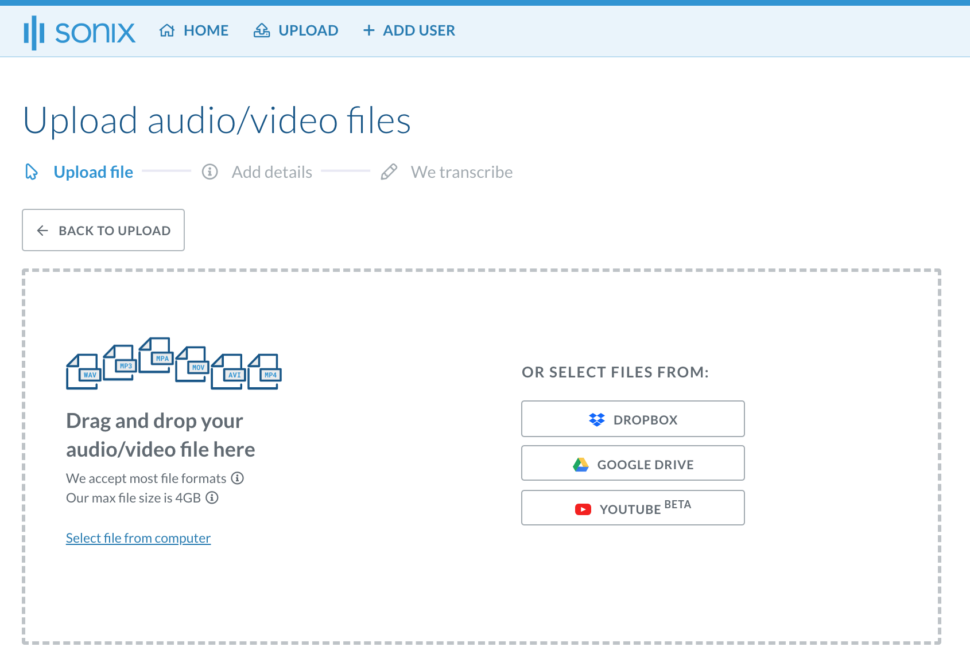
For a broader walkthrough of the process, see automatically convert your video to text in three easy steps.
Why Convert Your Vimeo Videos to Text?
There are several practical reasons to add a transcript to your Vimeo content:
- Accessibility: Transcripts and subtitles and captions make video content accessible to deaf and hard-of-hearing viewers and support WCAG compliance requirements.
- SEO and discoverability: Search engines cannot index spoken audio. A text transcript makes your Vimeo content findable by search engines and site search tools.
- Research and review: Researchers, journalists, and educators can search, quote, and cite specific moments without rewatching the full video.
- Content repurposing: Turn a Vimeo interview or webinar into a blog post, social snippet, or newsletter in minutes.
- Translation: Translate your Vimeo transcript into 54+ languages to reach global audiences, all inside the same platform.
What You Get with a Sonix Vimeo Transcript
Sonix gives you more than a raw text file. Every Vimeo transcript includes:
- Accurate, AI-powered transcription in 53+ languages
- Speaker identification and labeling
- Word-level timestamps synced to your video
- An in-browser editor to search and organize transcripts, edit, and annotate
- Export to TXT, DOCX, SRT, VTT, and more
- Automated subtitles you can burn into your video or export for upload
- End-to-end encryption and SOC 2 Type II compliant security
Frequently Asked Questions About Vimeo Transcription
Can I get a transcript from a Vimeo video for free?
Yes. Sonix includes 30 minutes of free transcription at sign-up. Paste your Vimeo link and get a full transcript to test accuracy before committing to a plan. No credit card is required to start.
Does Vimeo have built-in automatic transcription?
Vimeo offers basic captions on some paid plans, but the editing tools and accuracy are limited. Sonix gives you a fully editable transcript with speaker labels, word-level timestamps, and export options that Vimeo’s native tool does not provide.
How long does it take to transcribe a Vimeo video?
Sonix typically returns a transcript in a few minutes, well under real-time. A 60-minute Vimeo video is usually ready in under 10 minutes, depending on file length and audio quality.
What file formats can I export my Vimeo transcript in?
Sonix exports to TXT, DOCX, PDF, SRT, VTT, and more. That means you can drop your transcript directly into a video editor, CMS, or document workflow without any reformatting.
Can I translate my Vimeo transcript into another language?
Yes. Once Sonix transcribes your Vimeo video, you can translate your transcript into 54+ languages directly inside the platform. No separate tool needed.
World's Most Accurate AI Transcription
Sonix transcribes your audio and video in minutes — with accuracy that'll make you forget it's automated.


 English
  Spanish
  German
  French
  Russian
  Portuguese
  Dutch
Dutch  Chinese
  Turkish
  Danish