

In this article
If you’ve ever wanted to convert a YouTube video to text, you are not alone. Many people don’t have time to watch & listen to a whole video and could read the transcript much faster.
So how do you get a full text transcript of a YouTube video quickly? The answer is simple. Copy the YouTube link and paste it into Sonix, or upload the video file. Sonix turns the speech into a transcript that you can edit and export. Sonix says a one-hour video is transcribed in about 5 to 6 minutes. The link option is for paid Sonix accounts. On the free trial, you upload the video file.
Key Takeaways
- A paid Sonix account can transcribe YouTube videos from a link. The video must be public or unlisted.
- Trial accounts cannot import YouTube links by default. On a trial, upload the video file, or ask Sonix Support to enable links.
- The transcript has speaker labels and a timestamp on every word. You can export it as DOCX, PDF, TXT, SRT, or VTT.
- YouTube shows its own transcript for any video that has captions. Click “Show transcript” in the video description.
- The Sonix free trial includes 30 minutes of transcription, and no credit card is required. After the trial, Pay As You Go costs $10 per hour (as of November 2026).
Three Ways to Convert a YouTube Video to Text
The right method depends on your Sonix account and on who owns the video.
| Method | Works for | What you get |
|---|---|---|
| Paste the YouTube link into Sonix | Public or unlisted videos, on a paid Sonix account | An editable transcript with speaker labels and timestamps, plus document and subtitle exports |
| Upload the video file to Sonix | Your own videos, on any Sonix account, including the free trial | The same transcript and exports |
| Open the transcript on YouTube | Any YouTube video that has captions | The caption text beside the video, for reading and for jumping to a moment |
How to Convert a YouTube Video to Text with a Link
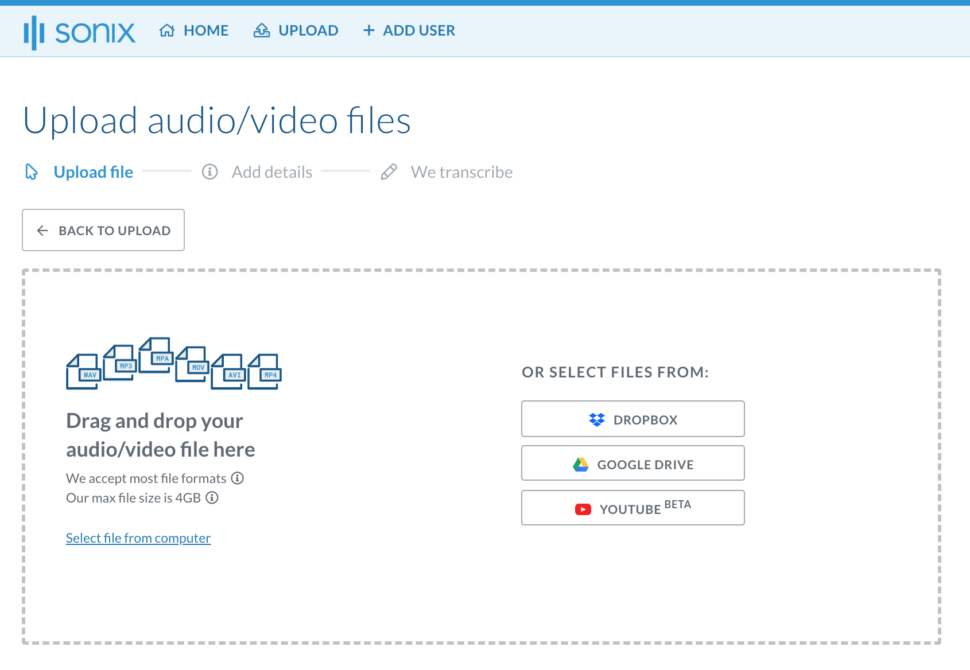
On a paid Sonix account, you paste the link and Sonix fetches the video. Use this method for your own videos and for videos that you have permission to use. These steps come from the Sonix help center article on how to upload a link to Sonix.
- Open the video on YouTube and click the Share button below the video. Copy the full link.
- Log in to Sonix and click “Upload”.
- Choose Single-Track or Multi-track. Then select the “Video Link” option.
- Paste the YouTube link and click “Transcribe Video Link”.
- Select the language spoken in the video from the drop-down menu.
- Click “Transcribe”. Sonix fetches the video and creates the transcript.
Three rules decide if a link works:
- The video must be public or unlisted. Sonix cannot reach private videos. It also cannot reach videos that need a sign-in, have an age restriction, or are blocked in some regions.
- The link must point to one video. Playlist links are not supported. Use the link from the Share button, without a timestamp.
- The account must be able to import YouTube links. Trial accounts cannot upload YouTube videos by default. Sonix Support can enable the feature.
A YouTube link costs the same as a file.
How to Convert Your Own YouTube Video to Text by Uploading the File
On the free trial, upload the video file. This method is for videos that you uploaded to YouTube yourself. It also works when a link fails or when the video is private. YouTube Help states that you cannot download the videos of other users.
- Find the original video file on your computer. If you no longer have it, you can download your own video from YouTube Studio.
- In YouTube Studio, select Content from the left panel. Select the video, then select Menu and Download. YouTube saves an MP4 file in 720p or 360p.
- In Sonix, click “Upload” and choose the file. Sonix accepts MP4, MOV, AVI, WebM, and other common formats.
- Select the language spoken in the video and start the transcription.
- Read the transcript in the Sonix editor, correct names and terms, and export it.
Start a free trial, upload the file, and export the transcript. The trial includes 30 minutes of transcription, so keep the trial video shorter than 30 minutes.
What You Get from a Sonix Transcript
Each Sonix transcript includes these things:
- Text with timestamps. Every word has a start time and an end time. Click a word in the browser editor and the audio plays from that moment.
- Speaker labels. Sonix detects when the speaker changes and starts a new labeled paragraph. The labels are automatic, so check them and type the real names.
- Document exports. Download the transcript as DOCX, PDF, or TXT.
- Subtitle files. Sonix creates subtitles and captions from the same transcript. Export SRT, VTT, or TTML, or download a video with the captions burned in.
- Translation. You can translate the transcript into 54+ languages. Each translation keeps the timing and the speaker labels.
Sonix transcribes in 54+ languages and reports up to 99% accuracy on clear audio.
You can also add the corrected captions to your YouTube video. Export an SRT or VTT file from Sonix and upload it in YouTube Studio under Subtitles. YouTube supports both file types. The guide to the SRT file format explains how these files work.
How to See the Transcript YouTube Already Has
YouTube has its own transcript panel. According to YouTube Help, you can view the full transcript of any video that has captions.
- Open the video on YouTube.
- In the video description, click “Show transcript”.
- Read the text as the video plays. Click any line to jump to that part of the video.
The panel shows the captions of the video. Some captions are added by the creator. Others are automatic captions that YouTube creates with speech recognition. YouTube states that the quality of automatic captions may vary. If a video has no captions, YouTube has no transcript to show.
The YouTube panel is enough when you only want to read along or find one moment. Use Sonix when you need a document that you can edit and export, speaker labels, a translation, or subtitle files. The post on YouTube transcription gives more detail.
Limits to Know Before You Start
The Sonix help center lists a few more limits for YouTube links:
- Very long videos. A very long video can time out before Sonix fetches it from YouTube. Download the video and upload the file.
- Livestreamed videos. Videos that were livestreamed can cause processing or timing errors. Contact Sonix Support if this happens.
- Ads. Sonix does not transcribe YouTube ads. It processes only the main audio track of the video.
If a link fails and the video is yours, download it from YouTube Studio and upload the file to Sonix.
Frequently Asked Questions
Can I convert a YouTube video to text for free?
Yes, in two ways. YouTube shows a transcript for any video that has captions, and you do not need another tool for it. Sonix has a free trial with 30 minutes of transcription and no credit card. On the trial, upload the video file. After the trial, Pay As You Go costs $10 per hour, and the Core plan costs $25 per month with 5 hours included (as of November 2026). The pricing page lists every plan.
How long does it take to convert a YouTube video to text?
Sonix says that it transcribes a one-hour audio or video file in about 5 to 6 minutes. Plan extra time to read the transcript and correct names, numbers, and technical terms. Accuracy depends on the audio quality, background noise, and how clearly people speak.
Can I transcribe a YouTube video that I do not own?
Transcribe your own videos, or videos that you have permission to use. The YouTube Terms of Service do not allow you to download content unless the service authorizes it, or YouTube and the rights holders give written permission. For a video from someone else, ask the owner for the file or the transcript. You can also read the transcript panel on YouTube.
Sonix provides 30 free transcription minutes to test out. And there’s no credit card required.
World's Most Accurate AI Transcription
Sonix transcribes your audio and video in minutes, accurately enough that you'll forget a machine did it.


 English
 Spanish
 German
 French
 Russian
 Portuguese
 Dutch
 Chinese
 Turkish
 Danish