Organize & Search

Organize transcripts in folders, search across all your content, add custom labels for filtering, and jump to any moment with full-text search. Never lose track of important content again.

Nested folders
Full-text search
Custom labels
Folders
Search
Labels
Permissions
Filter
AI Summary
Instant
Search results
Find anything in milliseconds
Unlimited
Nested folders
Organize any way you like
Custom
Labels & tags
Create your own system
All
Content searchable
Every word indexed
Organization Features

Powerful tools to organize
and search your content

Organize with Folders

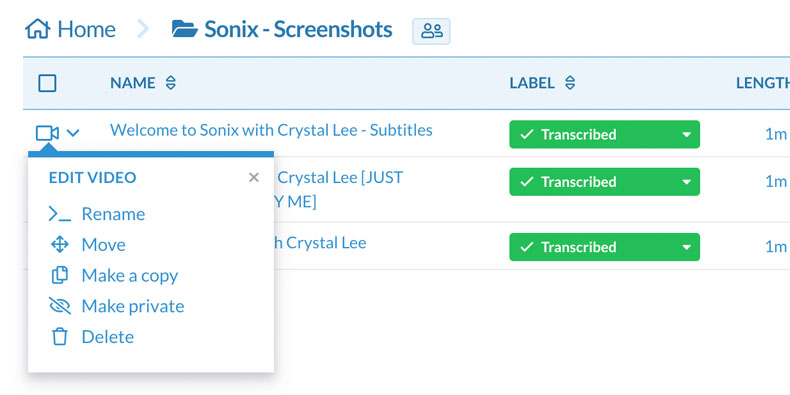
Create unlimited nested folders to organize your transcripts by project, client, date, or any system that works for you. Drag and drop to reorganize. Share entire folders with your team.

Organize transcripts with nested folders

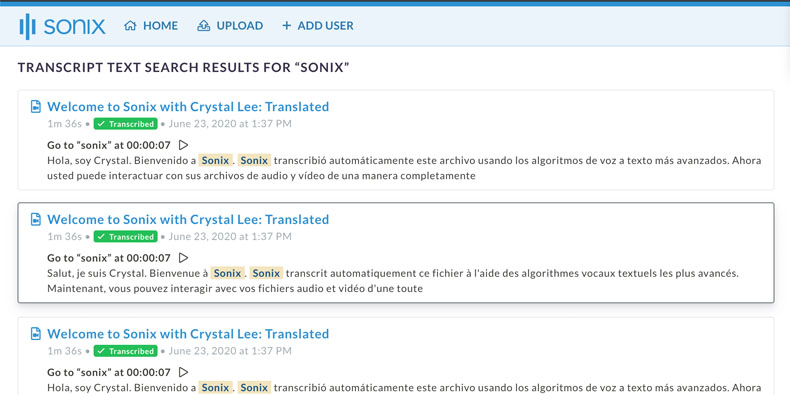
Full-Text Search

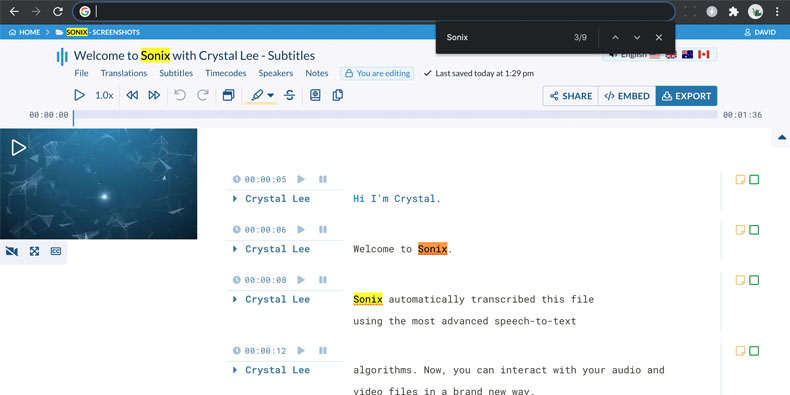
Search across all your transcripts instantly. Find any word or phrase and jump directly to that moment in the audio. Results show surrounding context so you find exactly what you need.

Full-text search across all transcripts

AI Summaries

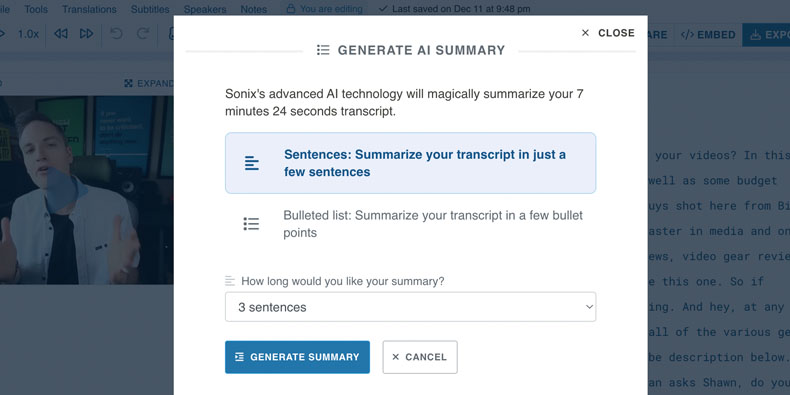
Generate AI-powered summaries of your transcripts. Get key points, action items, and important moments without reading the entire transcript. Perfect for quick reviews and sharing highlights.

AI-powered transcript summaries

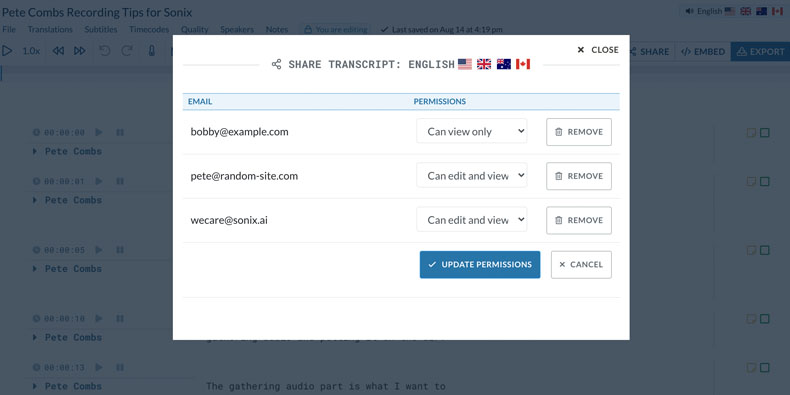
Folder Permissions

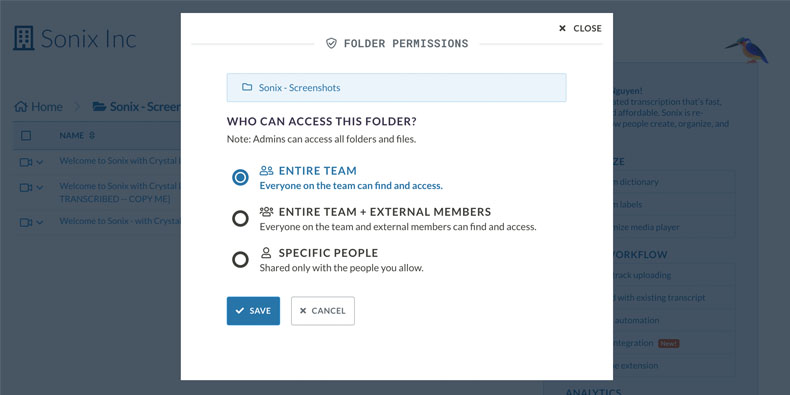
Control who can access each folder with granular permissions. Set different access levels for different team members. Perfect for client projects or confidential content.

Folder permission controls

File Permissions

Set permissions on individual files when you need fine-grained control. Override folder permissions for specific transcripts. Track who has accessed each file.

File-level permission controls

Advanced Search

Filter search results by date range, folder, speaker, or custom labels. Combine multiple filters to find exactly what you need. Save searches for quick access to common queries.

Advanced search with filters

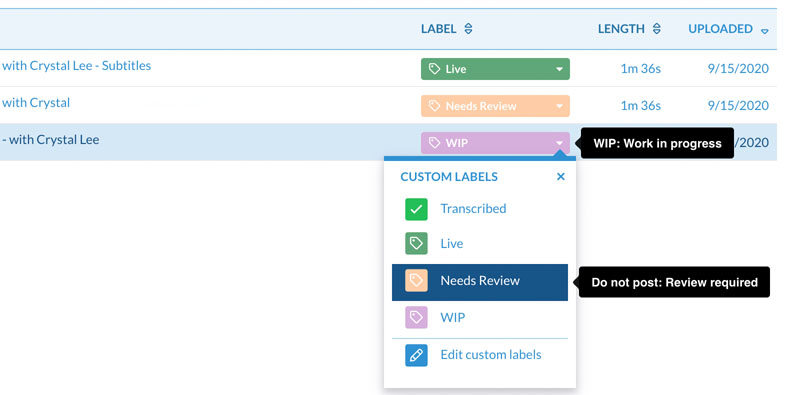
Custom Labels

Create custom labels and tags to categorize your transcripts. Filter by label to find related content quickly. Use labels for status tracking, project phases, or any classification system.

Custom labels and tags for transcripts
Common Questions

Everything you need to know about
organizing transcripts

How do I organize transcripts in Sonix?

Create folders to group related transcripts together. You can nest folders unlimited levels deep—perfect for organizing by year, client, project, or any structure. Drag and drop transcripts between folders, or upload directly to a specific folder.

How does search work in Sonix?

Type any word or phrase in the search bar to search across all your transcripts. Results appear instantly with surrounding context. Click any result to jump directly to that moment in the transcript and audio. Use filters to narrow results by date, folder, or labels.

Can I search within a specific transcript?

Yes. Open any transcript and use Cmd+F (or Ctrl+F) to search within that file. Results highlight in the transcript and you can navigate between matches. This is great for finding specific quotes or moments in long recordings.

What are custom labels and how do I use them?

Labels are tags you create to categorize transcripts your way. Create labels like 'Review Needed,' 'Client Approved,' or 'Q1 2024.' Apply multiple labels to any transcript. Filter your library by label to find related content quickly.

How do folder permissions work?

Each folder can have its own permission settings. Control who can view, edit, or manage content in each folder. Team members only see folders they have access to. This is perfect for separating client work or sensitive projects.

Can I search across my team's transcripts?

Yes. Search results include all transcripts you have access to—both your own and those shared with you. Folder permissions determine which content appears in your search results. Enterprise plans offer organization-wide search for admins.

Why Organize with Sonix

Never lose track of important content

Stay organized

Unlimited folders and custom labels let you organize content your way. No more hunting through files to find what you need.

Find anything fast

Full-text search across all transcripts returns results instantly. Jump to any word in any recording with one click.

Control access

Folder and file permissions ensure the right people see the right content. Share projects without exposing sensitive material.

Scale effortlessly

Whether you have 10 transcripts or 10,000, Sonix's organization tools scale with you. Fast search and smart folders handle any volume.

Why Choose Sonix

Built for professionals who
manage lots of content

Why is Sonix the best for organizing transcripts?

Sonix was built for professionals who work with lots of audio and video content. Our organization features—nested folders, custom labels, advanced search, and granular permissions—are designed for scale. Unlike basic tools, Sonix handles thousands of files without slowing down.

How do teams typically organize their transcripts?

Research teams organize by study and participant. Media companies use client and project folders. Legal teams create matter-based hierarchies. Marketing teams tag by campaign. Sonix's flexible system adapts to any organizational structure.

Is Sonix search really instant?

Yes. Sonix indexes all your transcripts for instant full-text search. Even with thousands of hours of content, search results appear in under a second. Our infrastructure is built to scale—we've indexed millions of hours across our customer base.

Can I migrate my existing file organization?

Yes. Import transcripts and maintain your existing folder structure. Upload via API to automate organization. Many customers mirror their existing systems—network drives, cloud storage, or project management tools—in Sonix for a seamless transition.

Customer Reviews

Trusted by professionals who
need to find things fast

4.98 rating from 211 reviews

I tried Sonix for the first time and I was astonished by the incredibile conversion accuracy.
RC
Rosario C.
Milan, Italy
I love, love, love this service! Sonix is amazing! I plan to use the transcripts I've gotten so far to update the content of my podcast so that it will aid in SEO on my website. Ve...
KI
Kiki I.
Washington DC, USA
You guys are the best...hands down!
TG
Thomas G.
Boston, Massachussettes
Wow. SPEED. Nice format, easy to read, liked the time stamps and speaker notification. Not a lot of formatting I had to strip before using. Simple.
BB
Becky B.
Washington DC, USA
So fast, so easy. This has saved me hours for every 20 minutes of recording.
WS
Wendy S.
Danvers, MA USA
Sonix is easy to use and high accuracy of the transcriptions. Very pleased!
JH
Juan H.
Bakersfield, CA, USA
Get Started

Organize your transcripts like a pro

Join thousands of professionals who organize and search their transcripts with Sonix. Get 30 minutes free—no credit card required.

Other great features by Sonix

The complete platform for
audio & video intelligence

99% accuracy. Every word matters.

AI transcription and translation in 53+ languages.

30 minutes free
No credit card
Cancel anytime